

Whether you’re moving into a new home, dealing with a lost remote, or troubleshooting a glitch, you must know how to reset your Craftsman garage door opener. This device is key to your home’s security and daily access, so resetting it quickly can help avoid unnecessary stress and restore smooth operation immediately.
This step-by-step guide will show you how to reset Craftsman garage door opener settings with simple and clear instructions. You won’t need to guess or call for help. Use this guide to fix your opener, stay safe, and confidently and efficiently control your garage.
Understanding Your Craftsman Garage Door Opener
Before attempting a reset, it helps to know how your Craftsman garage door opener works. Most units have the same key parts, such as the motor, sensors, keypad, and remote. The “Learn” button is the main part that helps the system work. Once you find it, you’re halfway to fixing any connection or setup issues.
Knowing your opener’s parts makes everything easier, whether it’s a belt drive, chain drive, or smart model. Understanding how your remote and keypad talk to the system helps when learning how to reset Craftsman garage door opener settings. A quick overview now saves time later and prevents confusion during the reset process.
Safety Precautions Before Resetting a Craftsman Garage Door Opener
Before you start, make sure you’re staying safe. Resetting an opener might seem simple, but it involves power, wiring, and moving parts that need careful handling.
Unplug the Power
Always unplug the opener or switch off the power at the breaker box before doing anything. This avoids electrical shock and keeps your hands safe during the reset.
Keep the Door Closed
Make sure the new garage door is fully closed. An open or halfway door can suddenly move and cause injury while you work on the reset steps.
Clear the Area
Remove anything near the garage door or opener. Make sure pets, kids, and any mess are out of the way so nothing gets in the way while you reset the opener.
Use a Step Ladder Safely
Grab a sturdy step ladder that can support your weight. Place it flat on the ground to help you safely reach the opener without slipping or wobbling.
Wear Gloves If Needed
Wear gloves for protection if you’re dealing with old wiring or dusty units. They help prevent cuts, shocks, or contact with grime and sharp parts.
Know Your Model First
Check your model type before learning how to reset Craftsman garage door opener units. Some older versions might have different steps or button placements.
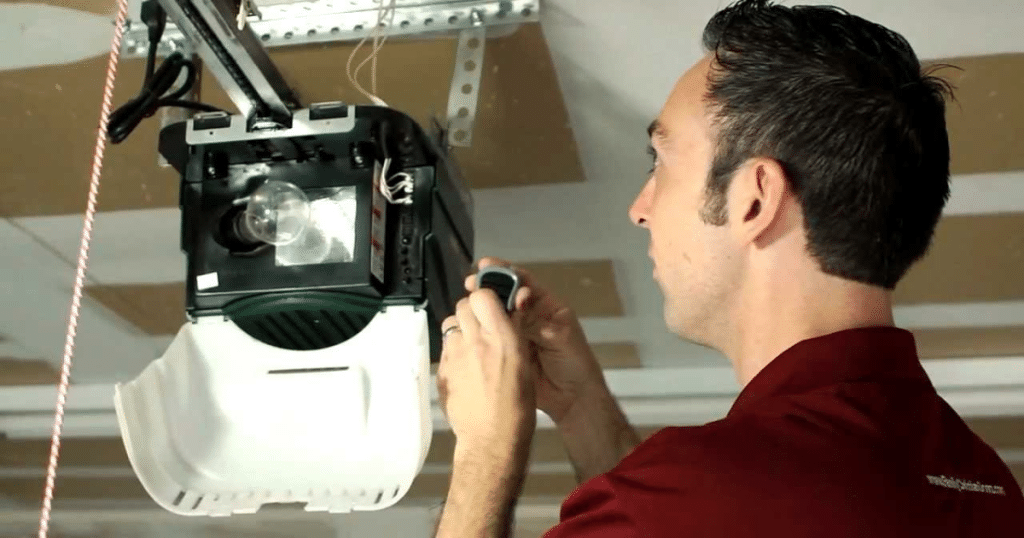
Simple Guide: How to Reset Craftsman Garage Door Opener
Resetting your Craftsman garage door opener does not take long, but every step matters. If you follow the process below carefully, your system will be working again in just a few minutes.
Step 1: Locate the “Learn” Button
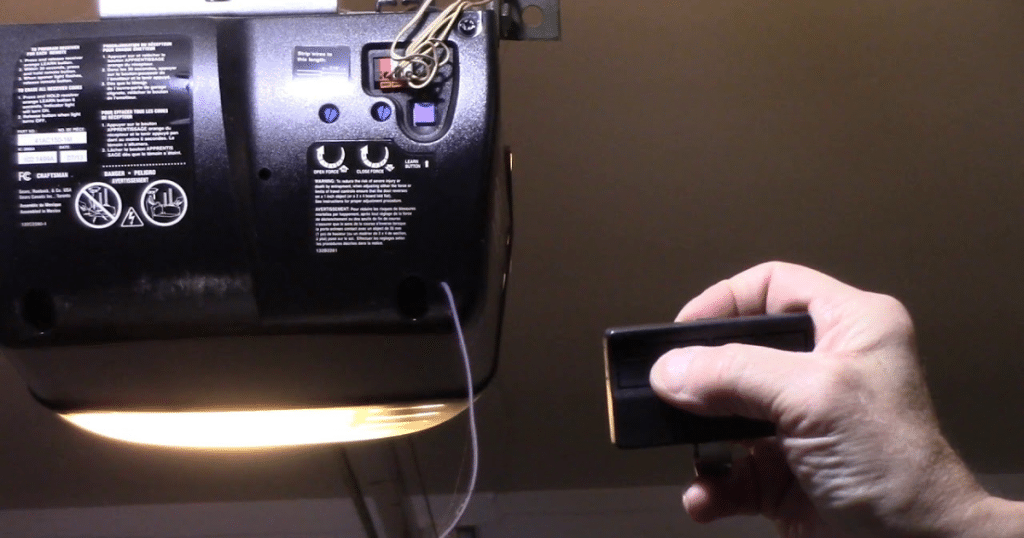
Find the “Learn” button on the side or back of the garage door opener motor. It’s usually next to the light cover and may be red, yellow, or purple.
Step 2: Press and Hold the Button
Hold the “Learn” button for about six seconds until the LED light turns off. This clears all stored remotes and keypads, completely wiping the system’s current memory.
Step 3: Let Go of the Button
Once the light goes out, release the button. All remote controls and wireless keypads are now disconnected and will no longer open or close the garage door.
Step 4: Reprogram Devices One by One
Press the “Learn” button again, then press the button on your remote or keypad within 30 seconds. A click or flash means the device has been paired successfully.
This method is the most trusted way to reset Craftsman garage door opener models. It’s quick and simple, and it helps you regain full control of your garage system.
Reprogram Craftsman Garage Door Remote After Reset
After learning how to reset Craftsman garage door opener settings, you must reconnect your remotes. It only takes a few quick steps to get everything working again.
1. Press the Learn Button Once
Tap the “Learn” button once on the motor unit. Don’t hold it down. This puts your opener into pairing mode for syncing a new remote control.
2. Press and Hold the Remote Button
Right after pressing the Learn button, press and hold your remote’s main button. Wait for a light blink or click sound to confirm successful pairing.
3. Repeat for Each Remote
If you have more than one remote, repeat the same steps for each. Just wait until one remote is fully paired before starting another.
4. Test All Remotes to Confirm
Once done, test each remote near your garage. Make sure the door opens and closes properly to confirm that everything was synced correctly during the setup.
How to Reprogram Craftsman Garage Door Keypad Without the Old Code
If you forgot your Craftsman keypad code, don’t worry. Following these simple steps, you can still set a new one without needing the old code.
1. Hold the Learn Button Until the Light Turns Off
Press the “Learn” button on the motor and hold it until the LED light turns off. This clears all stored keypad codes and resets the system.
2. Enter a New 4-Digit Code
Within 30 seconds of clearing the memory, go to your wall-mounted keypad. Type in a new 4-digit code you will remember, and keep it simple.
3. Press and Hold the Enter Button
After entering your code, press and hold the “Enter” button until the opener light blinks or you hear a click. That confirms the pairing worked.
Your new code is set and ready to use. Resetting Craftsman garage door opener keypads without using the old code is one of the easiest methods.
Fixing Issues After You Reset Craftsman Garage Door Opener
If your garage door opener doesn’t work after the reset, don’t panic. Quick checks can help you figure out what’s wrong and fix it quickly.
1. Check Your Remote and Keypad Again
Double-check that your remotes and keypad were reprogrammed properly. If they still don’t work, pair them again using the “Learn” button on the opener.
2. Replace Weak or Dead Batteries
Old or weak batteries can stop remotes and keypads from working. Replace them with fresh ones to make sure the signal gets through to the opener.
3. Watch for Signal Interference Nearby
Some LED bulbs or electronics can block the signal. Move them away from the opener to reduce interference and get a clean signal from your remote.
4. Try Power-Cycling the Opener
Unplug the opener from the wall, wait 30 seconds, and then plug it back in. This can help refresh the system if it’s stuck after the reset.
5. Repeat the Reset Steps Carefully
Sometimes, the reset process was rushed or missed a step. Go through the steps to reset your Craftsman garage door opener again, but take your time and do each part carefully.
If these steps don’t work, it may be time to contact a garage door repair technician. They can check for deeper issues and ensure your system stays safe and reliable.
Craftsman Garage Door Opener Maintenance Tips After Reset
After a reset, taking care of your garage door opener keeps everything running smoothly. These small steps can help you avoid bigger problems down the road.
1. Clean the Safety Sensors Regularly
Use a soft, dry cloth to wipe the sensors clean. Dust and dirt can block the signal, causing your door to stop or reverse unexpectedly.
2. Check Lights and Wire Connections
Look over the opener’s light cover, wires, and mounting. Make sure everything is tight and working so your system stays safe and trouble-free every time.
3. Change Remote and Keypad Batteries
Swap out batteries in your remotes and keypad every six months. Weak batteries can cause delays or make it seem like your opener isn’t responding.
4. Test Door Balance and Safety Features
Lift the door halfway by hand. It should stay in place. Also, test the auto-reverse by placing a block under the door when closing.
These simple habits help your opener last longer and prevent issues. You might not need to learn how to reset the Craftsman garage door opener again anytime soon.
When to Get Professional Help to Reset Craftsman Garage Door Opener
Sometimes, resetting Craftsman garage door opener settings is not enough. If your opener makes loud noises, blinks oddly, or does not move right, you may have a deeper problem. These signs could point to wiring or motor trouble. In that case, it’s safer to contact a garage door repair professional for help right away.
When a reset does not solve the issue, expert help is the smart move. A garage door repair technician can check everything from the sensors to the opener motor. They will spot hidden issues before they cause bigger damage. That way, your system stays safe, and you won’t deal with repeat breakdowns.
Frequently Asked Questions
How do I reset my Craftsman garage door opener without a remote?
You can reset it by holding the “Learn” button on the motor unit until the light turns off. Then, follow the steps to reset Craftsman garage door opener devices using the keypad or new remotes.
What should I do if my Craftsman garage door opener won’t respond after resetting?
Make sure your remotes and keypads are synced correctly and that the batteries are fresh. Also, check for power issues or signal interference from nearby electronics, such as LED lights.
Can I reset the keypad code without knowing the old code?
Yes, you can reset the keypad by holding the “Learn” button until the light turns off. Then type in your new 4-digit code within 30 seconds to save it.
When should I reset my Craftsman garage door opener?
It’s best to reset the system when moving into a new home, losing a remote, or if you think someone else may have access to your opener.
Is it okay to reset the garage door opener on my own?
Yes, it’s safe if you unplug the opener or turn off the power at the breaker first. Always use a stable ladder and follow the reset steps carefully.
Conclusion
Learning how to reset Craftsman garage door opener units doesn’t have to be stressful. You can keep your garage system running smoothly with a few easy steps and some regular upkeep. But it’s smart to call experts when things go beyond a quick fix. For trusted garage door repair in Livonia, MI, we’re here to help.
At Brother’s Garage Doors, we handle everything from opener resets to full system repairs. If your remote stops working or the keypad won’t respond, we’ll fix it fast. Fix small problems early before they get worse. Contact us today for dependable service and expert garage door repair in Livonia, MI, that you can count on.
End Note
Discover trusted, professional service at Brother’s Garage Doors, where we treat every garage like our own. Whether you need fast garage door repair, complete garage door replacement, or help with your garage door openers, we’ve got the tools, experience, and dedication to get it done right. We also handle garage door panels, garage door cables, and steel sectional doors for every type of home and budget.
When things go wrong, don’t wait. We respond quickly to garage door emergencies and handle broken garage door springs with care and precision. Check out our full list of services to see other ways we can help you. Learn more About Us, and check our service areas to see if we’re available near you. For tips, maintenance advice, and real customer experiences, visit our Blog or connect with us on Facebook and Yelp to see what others are saying.
Whether you’re learning how to reset Craftsman garage door opener systems or need expert service, we’re here to help. Go to our Contact Us page to set up your service today. At Brother’s Garage Doors, we’re proud to offer the most reliable garage door repair in Livonia, MI, and we are just one call away.
Brothers Garage Door Service
29522 Wentworth St, Livonia, MI 48154, United States
+17342920971